
EV Range and Battery Calculator
Find your electric vehicle range and battery size
Charge your EV and know when to unplug and get back on the road
Save your EV charging session data
Plan an EV trip with confidence
Find your EV charging stops on a map exclusive for EVs
Check and confirm your EV range while on the road
Know when to adjust your speed for better EV efficiency
Learn how to improve your EV range and efficiency
Know the charging percent needed to reach your destination
Stop electric vehicle range anxiety


This is the most important step for accurate electric vehicle range calculations. Car manufacturers specifications generally provide the total battery size - not the actual usable battery size. EVrc will accurately calculate the usable size.
Note: This is a one-time step. Once completed it should not need to be changed until the battery life begins to decrease its capacity.
Calculate your battery size
Start with the percentage you last charged your car to. Then check your car display for the kilowatt hours used since the last charge and the percentage left in your battery.
Here’s an example:
Last charge = 80%
Current state of charge (SOC) = 10%
KWh used since last charge = 60.2 kWh
This calculates your battery size to 86 kWh
If you know the battery size, but your car does not provide the kWh used since last charge, the usable battery size will generally be about 5 kWh less than the battery size. Example the Audi Q4 2024 e-tron has a battery size of 82 kWh and the usable is 77 kWh. Go to settings (the gear on the main screen) and set your battery to that usable size and save it.
Save it and you are ready to go

Setting is the gear on the main screen

Note: This screen is shown by default when selecting “Charging” after installing the EVrc app. After calculating the battery size, the “Save Battery Size” button will lock the battery size. If needed, you can go to “Setting” to unlock the battery size.
-
Usable battery capacity in an electric vehicle (EV) refers to the portion of the total battery capacity that is available for driving the vehicle under normal conditions. It's essentially the amount of energy stored in the battery that the vehicle's systems allow you to access without damaging the battery or affecting its longevity.
However, it's important to note that EV manufacturers typically do not allow the battery to be fully charged or fully discharged during normal operation. This is done to extend the lifespan of the battery and ensure its long-term health.
Here are a few key points about usable battery capacity:
Depth of Discharge (DoD): EV batteries are typically designed to operate within a certain range of their total capacity, known as the depth of discharge. For example, a manufacturer might specify that the usable capacity of a battery is between 20% and 80% of its total capacity. This means that you shouldn't regularly discharge the battery below 20% or charge it above 80% for optimal battery health.
Buffer Zones: To further protect the battery, EVs often have buffer zones at the top and bottom of the state of charge (SoC) range. These buffer zones help prevent overcharging or over-discharging of the battery, which can degrade its performance over time.
Displayed Range: The range displayed on your EV's dashboard or infotainment system is typically calculated based on the usable battery capacity, taking into account factors such as driving conditions, terrain, temperature, and driving style.
Actual vs. Advertised Range: The advertised range of an EV often reflects the usable battery capacity under ideal conditions. However, in real-world driving, factors such as temperature extremes, high-speed driving, and frequent acceleration can reduce the actual range experienced by drivers.
Understanding the usable battery capacity of your EV is important for managing range anxiety, planning longer trips, and optimizing the lifespan of your battery. It's also essential to follow manufacturer recommendations for charging and discharging to ensure the longevity and performance of your EV's battery.
-
The difference between the energy added by the charger (as shown on the dispenser) and the energy used by your car (as shown on the car's display) can be attributed to several factors:
1. Charging Efficiency Losses:
- When you charge your electric vehicle (EV), some energy is lost due to heat generation and the inefficiencies of the charging process itself. These losses can be due to the resistance in the charging cable, the power electronics in the car, and the battery’s internal resistance. As a result, the charger may deliver more energy than what the car's battery actually stores.
2. Battery Management System (BMS) Overhead:
- The Battery Management System in your car manages the charging and discharging processes to protect the battery and optimize its lifespan. The BMS might use some of the energy for monitoring and controlling the battery cells, leading to a discrepancy between what the charger reports and what the car displays.
3. Climate Control and Auxiliary Loads:
- If your EV's climate control system (like heating or cooling) or other auxiliary systems (like lights, infotainment, etc.) are running during charging, they will consume power. This energy consumption is generally not counted by the car’s display as charging energy but is included in the total energy drawn from the charger.
4. Differences in Measurement Precision:
- The energy meter in the charger and the car's internal meter may have different calibration standards or measurement methods, leading to small discrepancies in the energy readings.
5. State of Charge (SOC) Calibration:
- Over time, the car's estimation of its battery's state of charge (SOC) may slightly drift. After a charge, the BMS may recalibrate its SOC estimation, which could cause a mismatch in the energy accounting.
In summary, the charger typically reports the total amount of energy it delivered, while the car shows how much of that energy it considers usable after accounting for losses and internal consumption. This explains why the charger might show more energy added than the car reports as used.
-
A kilowatt-hour (kWh) is a unit of energy. It is commonly used to measure electricity consumption or production over time. Here's a breakdown of what it means:
Components of kWh:
1. Kilowatt (kW):
- A kilowatt is a unit of power, which is the rate at which energy is used or produced. One kilowatt is equal to 1,000 watts. Power (in watts) is calculated as the product of voltage (in volts) and current (in amperes). For example, a device that uses 1,000 watts (1 kW) of power consumes 1 kilowatt-hour of energy if it operates for one hour.
2. Hour (h):
- An hour is a unit of time. When measuring energy consumption or production, time is essential to understanding how much energy is used or produced over a certain period.
What kWh Represents:
- Energy Consumption:
- When you see a value in kWh on your electricity bill, it represents the total amount of electrical energy you've used over a billing period. For example, if you run a 1 kW appliance for one hour, it will consume 1 kWh of energy.
- Energy Storage and Production:
- In batteries, the kWh rating tells you how much energy the battery can store. For solar panels or other energy-producing systems, the kWh indicates how much energy they generate over time.
Example Scenarios:
- Household Appliances:
- If you have a 100-watt light bulb and you leave it on for 10 hours, it will consume:
100 \text{ watts} \times 10 \text{ hours} = 1,000 \text{ watt-hours} = 1 \text{ kWh
- Electric Vehicle:
- If an EV's battery has a capacity of 60 kWh, it means the battery can store 60 kilowatt-hours of energy. If the car consumes 15 kWh per 100 miles, the battery could theoretically power the car for about 400 miles (60 kWh / 15 kWh per 100 miles = 4 x 100 miles).
Summary:
- A kilowatt-hour (kWh) is a measure of energy that combines the rate of energy use (power in kilowatts) with the time that energy is used (hours). It is a standard unit for measuring electricity consumption, battery storage, and energy production.

Charge Your EV

Tap the “Start Timer” button
Starting charge - move the slider to the current SOC*
Ending charge - move the slider to the desired ending charge
Move the Odometer wheel to your current mileage
Adjust the cost per kWh using the slider
* SOC = state of charge
Use the up and down arrows to make small incremental changes
When charging is complete
Tap the “Stop Timer” button
EVrc will calculate
Time charging
Total cost of the charging session
Total kWh Added
Average charging speed
Tap the “Save Charging Session” button
You can now view the charging sessions saved in the “Charging History” button.
-
Why Charging to a Maximum of 80% is Recommended
1. Battery Longevity
Charging an electric vehicle (EV) battery to 100% can reduce its lifespan. Lithium-ion batteries, which are commonly used in EVs, degrade faster when they are charged to full capacity regularly. Charging to 80% helps in maintaining battery health and extends the overall life of the battery.
2. Thermal Management
Fully charging a battery can cause it to generate more heat. Excessive heat can lead to thermal stress, which not only affects battery health but can also cause safety concerns. Charging to 80% helps in managing the battery temperature more effectively.
3. Optimized Charging Cycles
Most EV batteries are designed to handle numerous charge cycles. However, the depth of discharge (DoD) impacts the number of cycles a battery can endure. Keeping the charge within a lower range (20-80%) helps in optimizing these cycles, ensuring the battery remains efficient over a longer period.
4. Faster Charging
Charging the last 20% of an EV battery typically takes longer due to the need to balance the battery cells and prevent overcharging. By charging only up to 80%, you can reduce the overall charging time, making it more convenient for daily use.
5. Regenerative Braking Capacity
EVs use regenerative braking to convert kinetic energy back into stored energy in the battery. When the battery is fully charged, there's less capacity to store this energy, reducing the effectiveness of regenerative braking. Keeping the charge level at 80% ensures there is room to store energy from regenerative braking, enhancing efficiency.
6. Improved Range Planning
While a full charge might provide the maximum range, most daily commutes and trips do not require the full capacity of the battery. Charging to 80% is usually sufficient for daily driving needs, allowing better range planning and minimizing unnecessary strain on the battery.
Conclusion
Charging your EV to 80% is a practical approach that balances the need for sufficient driving range with the benefits of prolonging battery life, improving thermal management, and optimizing charging efficiency. This practice not only helps in maintaining the health of the battery but also enhances the overall performance and reliability of the electric vehicle.
-
Tips for Using EV Charging Stations
1. Plan Ahead:
• Use EV charging apps or maps to locate charging stations along your route.
• Check the availability and status of the charging stations before you arrive.
2. Understand Charging Levels:
• Level 1: Standard 120V outlets, slow charging, suitable for overnight or emergency use.
• Level 2: 240V outlets, faster charging, commonly found at public charging stations, homes, and workplaces.
• DC Fast Charging: Rapid charging, usually found at highway rest stops and dedicated charging hubs.
3. Bring Necessary Equipment:
• Carry your EV charging cable and any necessary adapters.
• Ensure your charging cable is in good condition and properly rated for your vehicle.
4. Follow Charging Etiquette:
• Only use a charging station if you need it. Avoid occupying a spot once your car is fully charged.
• Move your vehicle as soon as charging is complete to make space for others.
• Do not unplug other vehicles unless they are fully charged and it’s a shared community charger.
5. Be Aware of Charging Costs:
• Understand the cost structure of the charging station (time-based, per kWh, or flat fee).
• Check if there are any membership programs or discounts available.
6. Monitor Charging:
• Use your vehicle’s app or the charging station’s app to monitor the progress of your charge.
• Set notifications to alert you when your vehicle is fully charged.
7. Stay Safe:
• Ensure the charging area is well-lit and secure, especially at night.
• Handle charging equipment carefully and follow all safety instructions provided by the manufacturer.
8. Respect the Environment:
• Dispose of any trash properly and keep the charging area clean.
• Report any issues with the charging station to the service provider.
9. Check for Updates:
• Regularly update your EV’s software to ensure compatibility with new charging technologies.
• Keep up with news and updates on charging infrastructure in your area.
10. Consider Charging at Non-Peak Times:
• If possible, charge your vehicle during off-peak hours to avoid congestion and potentially lower costs.

Charging History
EVrc will store all of the data for all charging sessions.
Benefits:
Past trips provide key data for future trips
Charging station locations are saved along with speed of charging
Costs are recorded for past and future consideration
Mileage is kept
Efficiency is recorded
Future plans for EVrc include incorporating Artificial Intelligence to quickly analyze data of past trips and to project useful information for current or future trips.

Understanding the Range of your EV

Why it is important
The charging infrastructure is growing fast, but it still has a way to go
Reliability of charging stations is getting better, but it also has a way to go
EVs require some trip planning - the more you know about your EV the less stress you will encounter
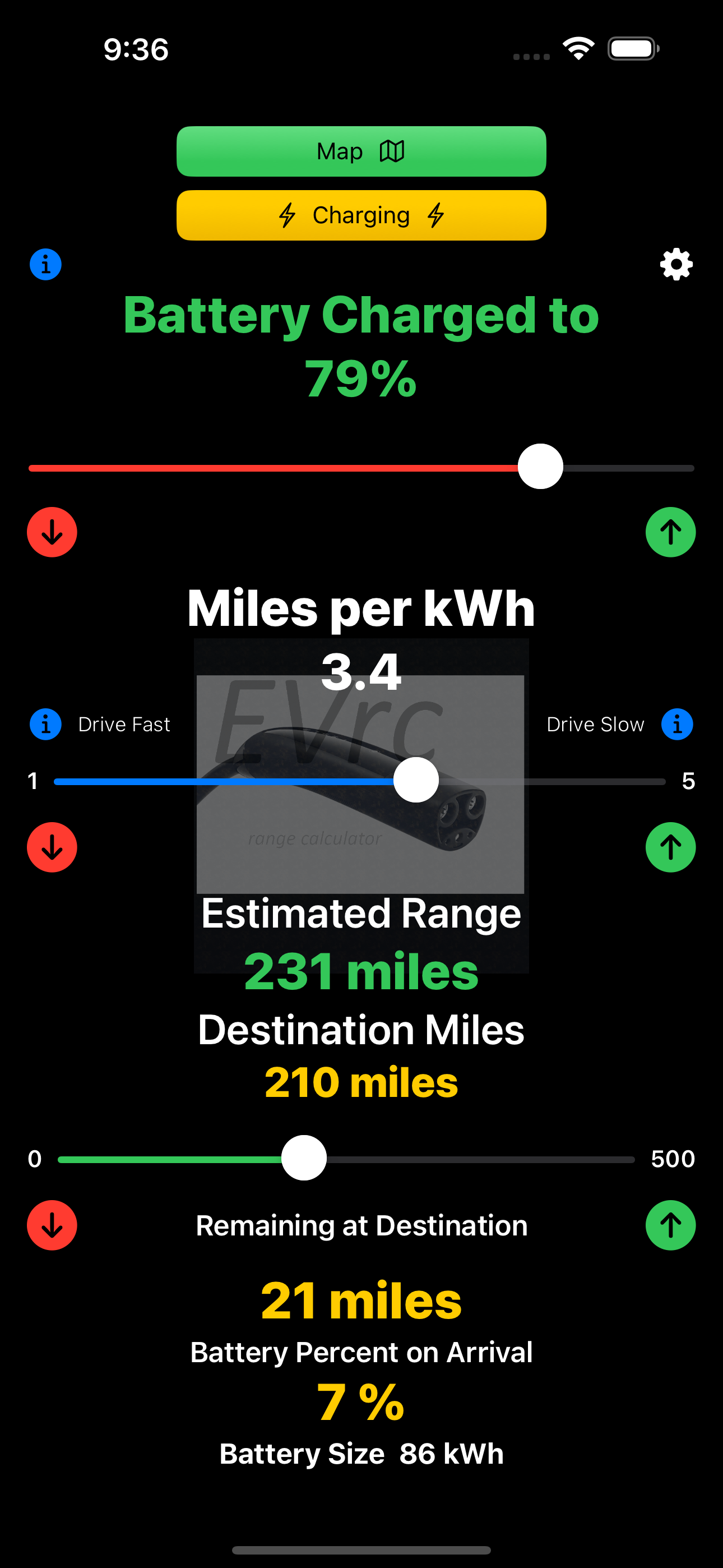
Your EV likely is calculating range based on EPA ratings - not the way you drive. EVrc can accurately calculate based on your driving habits and weather conditions. If you want to drive faster, you can adjust the efficiency slider to calculate the range needed.
What you need to know about efficiency
All EVs have built in efficiency monitoring. EV manufactures use either:
miles or km per kWh
- or -
kWh per 100 miles or km
Set EVrc in settings to match your car’s monitoring type. Settings is the gear symbol in the upper right corner of the screen.
Settings is the “gear” in the upper right corner of the screen
Examples: Your EV may have an average efficiency of 3.4 miles per kWh. This means that if you have a fully charged 86 kWh battery, 1 kWh of your battery is used to travel 3.4 miles. Your range would by 291 miles.
The other example calculation is if your car uses 28 kWh of your battery to travel 100 miles your range with a 86 kWh battery would be 305 miles.
Fortunately your car keeps track of your efficiency both in real time and historically. This allows you to learn the efficiency based on the way you drive and the conditions you drive in. With this knowledge you can quickly adjust the EVrc efficiency slider to calculate before you head out and again along the way.

Learn more about improving efficiency…
-
Speed affects efficiency. Driving at faster speeds will reduce your range.
If you are not getting the needed efficiency to reach your destination, slowing down is your best option. You can't control the weather and going up hills, but you can control your speed
-
Elevation plays a significant role in the efficiency of electric vehicles (EVs). When driving at higher elevations, several factors can influence the performance and energy consumption of your EV:
1. Air Density:
• At higher elevations, the air is thinner, which means there is less aerodynamic drag on the vehicle. This can slightly improve efficiency as the vehicle requires less energy to overcome air resistance.
2. Battery Performance:
• Batteries tend to perform better in cooler temperatures commonly found at higher elevations. However, extremely low temperatures can negatively impact battery efficiency and reduce the vehicle’s range.
3. Regenerative Braking:
• Driving downhill allows EVs to use regenerative braking more effectively, converting kinetic energy back into stored energy in the battery. This can significantly enhance efficiency and extend range during descents.
4. Energy Consumption During Ascents:
• Climbing to higher elevations requires more energy as the vehicle works harder against gravity. This increased demand can temporarily reduce efficiency and deplete the battery faster.
5. Impact on HVAC Systems:
• At higher elevations, temperature fluctuations can be more extreme, necessitating the use of heating or cooling systems. The use of HVAC (heating, ventilation, and air conditioning) systems can increase energy consumption and affect overall efficiency.
Practical Tips
• Plan Your Route: When traveling through mountainous areas, plan your route to take advantage of downhill sections for regenerative braking.
• Monitor Battery Levels: Keep an eye on your battery levels, especially during long ascents, and plan charging stops accordingly.
• Optimize HVAC Usage: Use HVAC systems judiciously to conserve energy, especially during significant elevation changes.
-
How Weather Affects EV Efficiency
Weather conditions can significantly impact the efficiency and range of electric vehicles (EVs). Here’s a breakdown of how different weather elements can influence your EV's performance:
#### 1. Temperature:
- Cold Weather:
- Battery Performance: Cold temperatures can reduce battery efficiency and capacity. This results in lower driving range and longer charging times.
- Heating Systems: Using the vehicle’s heating system increases energy consumption, further reducing range.
- Tire Traction: Snow and ice can decrease tire traction, requiring more energy for driving.
- Hot Weather:
- Battery Management: Extreme heat can cause the battery to overheat, leading to reduced efficiency and potential long-term battery degradation.
- Cooling Systems: Air conditioning use increases energy consumption, which can decrease range.
- Tire Pressure: High temperatures can increase tire pressure, affecting vehicle handling and efficiency.
#### 2. Precipitation:
- Rain:
- Increased Resistance: Wet roads increase rolling resistance, requiring more energy to maintain speed.
- Safety Features: Use of headlights and windshield wipers also adds to energy consumption.
- Snow and Ice:
- Energy Use: Defrosting windows and using heated seats and mirrors increase energy use.
- Traction: Slippery roads can lead to less efficient driving conditions, requiring more frequent acceleration and deceleration.
#### 3. Wind:
- Headwinds:
- Driving against strong headwinds increases aerodynamic drag, causing the vehicle to use more energy to maintain speed.
- Tailwinds:
- Driving with a tailwind can reduce energy consumption by assisting the vehicle’s forward motion.
#### Practical Tips:
- Precondition Your Vehicle: If possible, precondition your EV while it’s still plugged in. This means heating or cooling the cabin and battery before you start your journey, using grid power instead of the vehicle’s battery.
- Optimize HVAC Usage: Use seat heaters and steering wheel heaters instead of cabin heating to reduce energy consumption in cold weather.
- Monitor Tire Pressure: Regularly check and maintain optimal tire pressure for better efficiency and handling in all weather conditions.
- Drive Smoothly: Smooth acceleration and deceleration can help maintain efficiency regardless of weather conditions.
- Plan Charging Stops: Plan your route and charging stops with weather conditions in mind. This is particularly important for long trips in extreme temperatures.
By understanding and adapting to weather conditions, EV drivers can maximize their vehicle’s efficiency and ensure a more reliable driving experience.
-
Headwinds kill range. Tailwinds increase range. If you are in a headwind, you can increase your range dramatically by drafting (tailgating) a large truck.
Here’s a tip to reduce stress….
While on your road trip, check the distance remaining to the destination.
Move the destination slider to the distance remaining.
Move the SOC percentage slider to match your battery’s current percent.
Adjust the efficiency slider to a remaining battery amount on arrival (example 3%).
Use that efficiency number as a target number needed. If you are not meeting that target, reducing your speed will help. Focus on the current efficiency as you continue your trip and adjust your speed as needed.
If you are driving in a headwind, you can draft (tailgate) a large truck to increase your range.

Map - finding your next EV charging station


This app is for both current EV owners and future owners, built to reduce range anxiety. Designed for simplicity so that any non-technical EV owner will learn the limits of their EV and best practices to achieve the best range and charging experience. It is also designed to provide trip planning without needing to use multiple apps. It saves charging sessions, range and efficiency to help you on future trips. Quick and easy to use while you are sitting in your car at the charging station.
Designed and built by an EV owner and enthusiast who wanted one app to do it all.
Features:
Range calculation you adjust for your driving habits, conditions and speed
Charging sessions details - logged and saved and available for viewing
Calculates battery size automatically by using charging session details
Map for locating charging stations with details and directions including distance and change in elevation.
Distance to destination calculates the percentage used to reach your destination.
Elevation change (up or down) is calculated for planning your battery consumption.
Details are provided of charging stations you select.
EVrc will calculate the usable battery size of your EV for accurate range estimates.
In a charging session you only need to add this information using slider controls:
Starting Charge Percent
Ending Charge Percent
Price per kWh
Time charging (timer included in app)
* EVrc will calculate the other variables needed.
Take control of your electric vehicle (EV) journey with EVrc Range Calculator, the ultimate tool to eliminate range anxiety and optimize your driving experience. While on the go, this app allows you to quickly calculate the remaining range based on the efficiency of your EV. You will quickly know what efficiency is required to reach your destination. With that information, you can improve range by reducing your driving speed if needed.
EVs provide range data, but often the data provided is overly optimistic or based on previous conditions. Also, most manufacture's projections are based on EPA estimates which are for drivers likely not like you. EVrc allows real-time cross-checking - reducing range anxiety. It will also help you understand the math involved with EV batteries and the calculations used for range.
Keep track of all your charging sessions - including time charging, starting percent, ending percent, kWh added, cost, location and average charging speed. Saving this data will allow future updates of EVrc to predict future trips based on past history.
EVrc will help you learn the technology of EV vehicles and it has info buttons that explain important questions new EV owners have. The more you know, the more confidence you will have making roadtrips and enjoying the many benefits of owning an EV.
If you like EVrc please give us a rating and review. Also, suggestions for future updates are welcome.
Contacting us at: evrc.rangecalculator@gmail.com or on X at @EVrcRange

Take control of your electric vehicle range anxiety with EVrc. Download free in the Apple Store.

If you love adventure, you will love driving an EV